Showing posts with label COMPUTER. Show all posts

Monday, December 13, 2010

TOP 10 GAMING KEYBOARDS

1 comments

1.Logitech G19 Keyboard

g19 Top 10 Gaming Keyboards
The general consensus is that Logitech’s latest gaming keyboard, the G19, is better in nearly every way than the G15 it’s poised to replace. The most notable improvement of the G19 is the inclusion of a bright 320×240 tilting LCD screen. Users can view the time, resource load, VoIP communication data, and even watch YouTube videos on the nifty display, in addition to a host of other uses.More macro keys are found on the G19, along with the ability to adjust the color of the backlight. All in all, it’s a worthy successor to one of the most popular gaming keyboards on the market.

2. Saitek Cyborg Gaming Keyboard

saitek cborg gaming keyboard1 Top 10 Gaming Keyboards
For the big gamers, this keyboard will keep you on the up side of gaming with its many different programmable keys and its “Cyborg” mode to do away with modern day keys.
i)Setting Up :Setting up the keyboard is a piece of cake, as most of the functions work without the need to install the driver software. Find the USB connector labeled ‘KBD’ and plug it into a spare USB slot on your PC.
ii) Lightning: The lighting is one of the Cyborg’s biggest selling points and is controlled from the touch-sensitive panel at the top of the keyboard.
Iii) Programmable Keys: There are twelve C-keys in total, six down each side of the keyboard, and their functions are decided by the setup in the driver software.
iv) Metal keys Another unique feature of the Saitek Cyborg is its metal keys. Saitek claim that the key gaming buttons have ‘hard-wearing, metal-plated key caps’, although this only includes the four arrow

3.Razer Tarantula
razer tarantula keyboard 550x293 Top 10 Gaming Keyboards
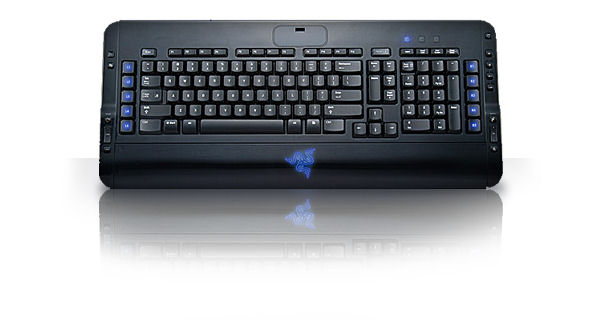
The Razer Tarantula just oozes style. With its glossy black finish, soft rubber-coated keys and cool blue backlighting it really does look good.
It’s not all show, either, as it packs a host of features into that black case. As you’d expect there are programmable keys, including ten special gaming keys down the sides of the keyboard. The Tarantula is particularly good in this area as it has 32KB of on board memory that can store up to five key profiles. This means you can take the keyboard with you, plug it into another PC and still be able to access your stored key profiles.

4. Logitech’s G15
logitech g15 keyboard 5 550x423 Top 10 Gaming Keyboards
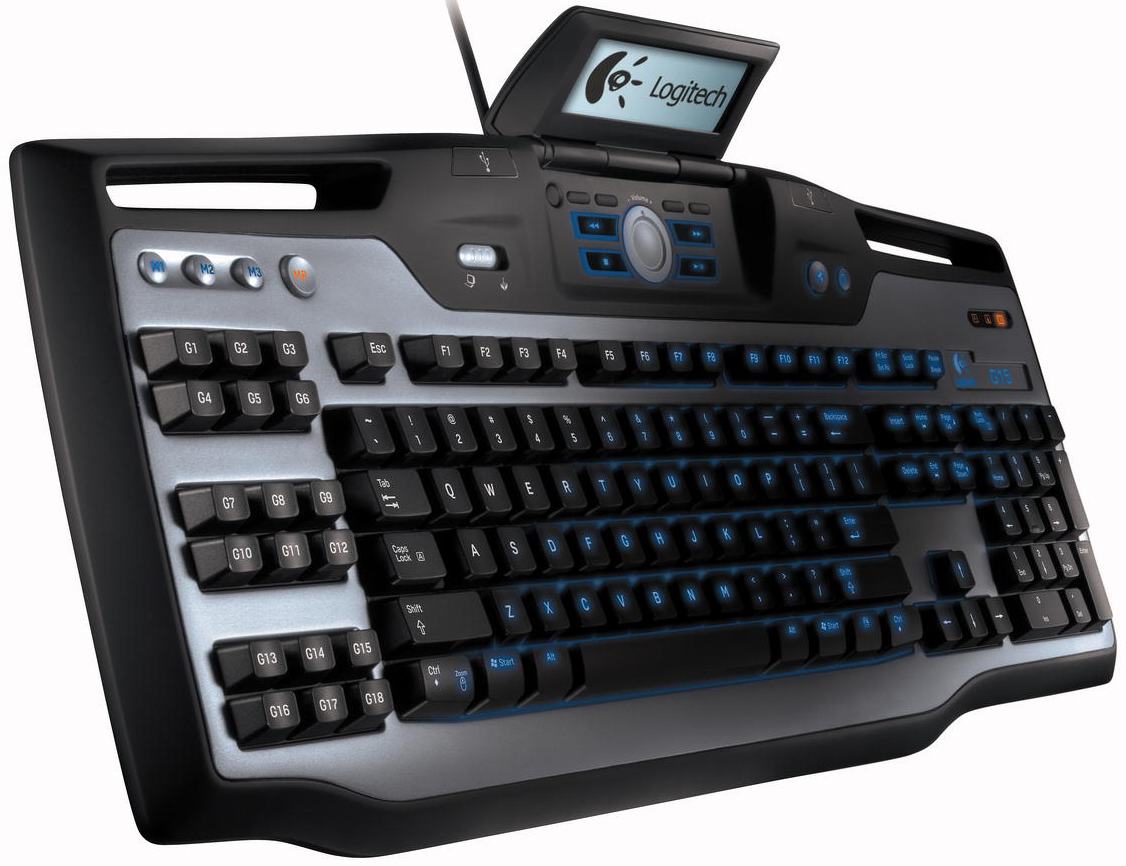
Logitech’s G15 was an awesome keyboard, and was generally great for gaming. Not so much because of the multitude of macro keys and the largely useless LCD, but rather because of the backlit keys and the comfortable layout..The biggest change is that it’s now much smaller, which is a good thing in our opinion. There’s no longer a huge array of macro buttons on the left-side of the keyboard. Instead there is just a single strip of six keys, and then three “channel” keys giving you access to 18 macros.
There’s a “macro record” button that makes recording macros very simple. You just press the MR button, press a macro key that you want to use, then type out your combination of keys, and press the MR button again and you’re done. You can also use the included software to make macros and assign keys to certain functions.

5. Optimus Maximus
optimux 550x550 Top 10 Gaming Keyboards
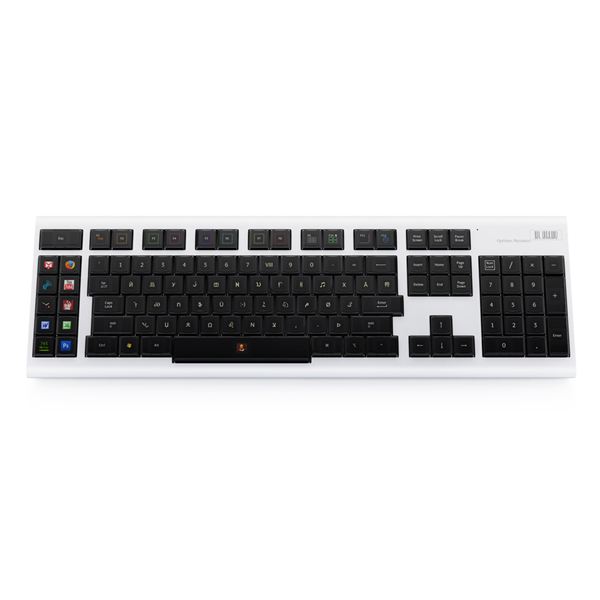
This is out of the price range of most gamers, but you have to take a look at it! It’s the wave of the future. Each key is its own OLED display, so you can change the keys to a variety of different setups. You can switch from a Qwerty display to a gaming display. The OLED displays are color and fully customizable. If you have to have the best out there, then this is the keyboard for you. At the very least, it will make great conversation the next time you are with your gaming buddies.

6.Ideazon Merc Stealth
idea 550x261 Top 10 Gaming Keyboards
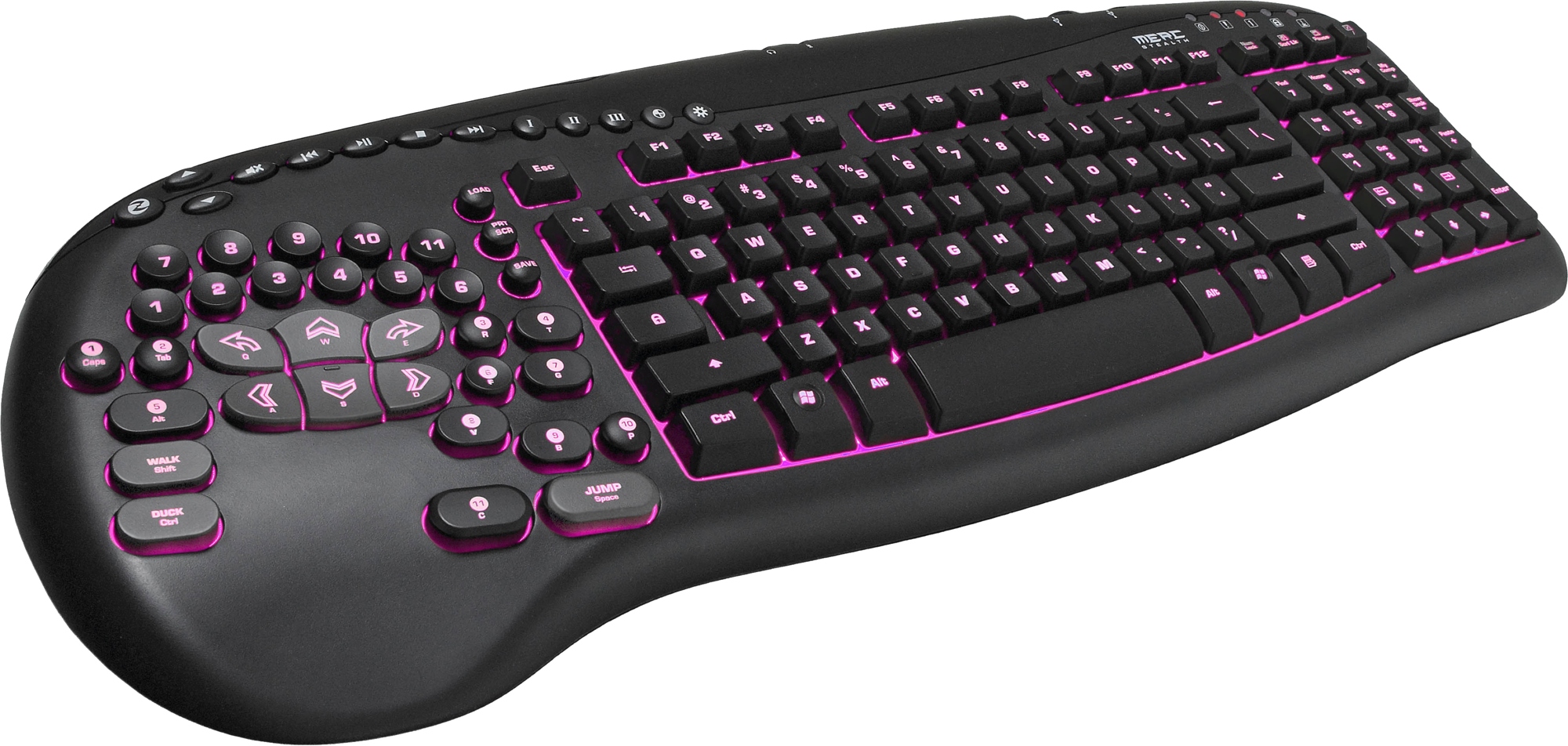
The Ideazon Merc Stealth takes a different approach to the idea of a gaming keyboard by including a dedicated gaming keypad built into the left-hand side of the keyboard.This keypad area groups all of the usual gaming keys into a natural layout with direction keys larger than normal. In total there are 34 programmable keys, which can store macros for your favourite game actions.
The gaming keys are programmed through Ideazon’s Z Engine software, which is intuitive and easy to use. Once setup, the gaming keys are comfortable to use with a nice rubber coating, and give good tactile response when you press them.

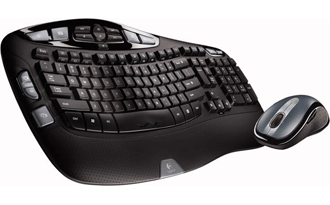
7.Logitech Cordless Desktop Wave Review
log tevh cardless Top 10 Gaming Keyboards
The keyboard is certainly the star of the show here, as it features an unusual wave design that runs contrary to the established ergonomic keyboard design philosophy. The Wave, however, takes a different tack by using a straightforward orientation of the keys, but including a gentle down slope on both sides of the keyboard to compensate for the fact that our middle fingers are longer than our index and pinky fingers. It’s not just that some buttons are shorter than others, though. The keys are all specifically designed to curve smoothly up and down, and if you look at the keyboard from a profile view, you can see the difference in key size.

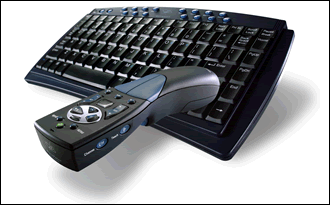
8. Gyration’s Media Center Remote and Keyboard
gyrtain Top 10 Gaming Keyboards
It allows you to access every aspect of your Media Center PC from up to 100 feet away from the base unit. The keyboard works flawlessly and has some great multimedia features. The gyroscopic mouse was comfortable to use as well as easy to learn, however, the remote control functions and design could use some serious improvement.Gyration has come up with some innovative ways to incorporate their Gyro technology into a Media Center remote, but we feel they still have a bit of work to do. Its main flaw is the lack of number buttons which are often used while watching TV, but there were several other issues we had with the remote.

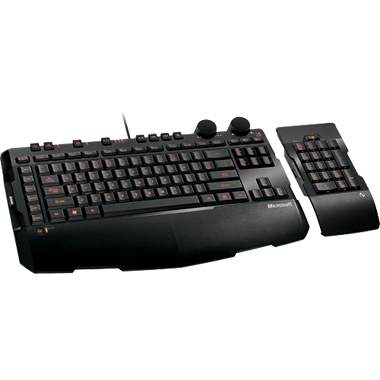
9. SideWinder X6 Gaming Keyboard
side w Top 10 Gaming Keyboards
Including in SideWinder Division which is High-End Gaming Peripheral Microsoft Division and released with the newest generation SideWinder Mouse which are X5 and X8, X6 those are the ones of Gaming Keyboard in SideWinder series. Thin, Low-Profile with sharp shape design that in all can called minimalist also completed with bright red backlighting and soft amber yellowish. Unification between design and interesting color. With size 513 x 234 mm (included numpad),it’s wide enough but Low-Profile factor makes X6 still looks simply and unseen as wide like general Gaming Keyboard in market. Standard features in Gaming Keyboard like Macro, Backlit, and Media Player Keys still available, only in this keyboard all of that available in dense shape.

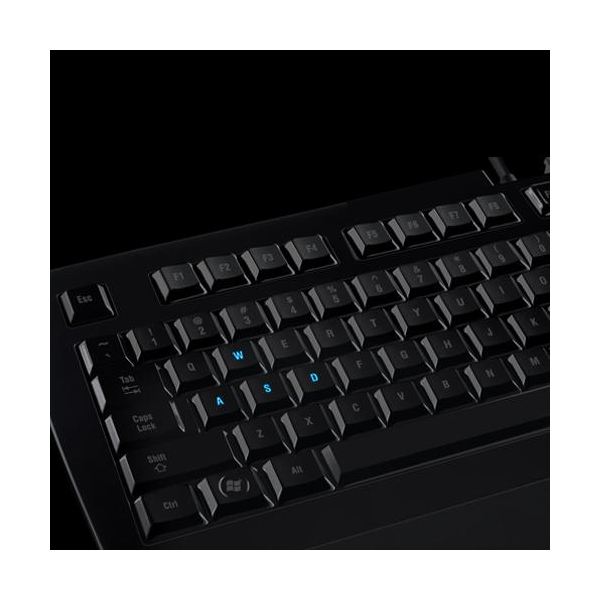
10. Razer Lycosa Mirror Special Edition Gaming Keyboard
razer lycosa 550x550 Top 10 Gaming Keyboards
With each key having its own light, playing games has been taken to the next level. This keyboard is known worldwide by all the big-time gamers, and that puts this model as one of the ten best computer keyboards.
The Arctosa and Lycosa. Both of these keyboards are very similar, and their major selling point is the customizability of every single key on the board. The Lycosa Mirror is the same as the original Lycosa, except with a mirror black plastic finish over the whole keyboard. These features include, but are not limited to, pass-through USB, headphone, and microphone jacks, backlit keys, a media touchpad, and fully customizable keys.

Wednesday, October 13, 2010

Top 10 Mice for Gamers and Designers

0 comments
While being choosy about mice might seem more geeky than usual, but the fact is that high performance mice with huge DPIs can make a hell lot of difference to your gaming experience and can help you crop those parts of the image in photoshop that require micro-precision.

No 10. Saitek Cyborg Laser Gaming Mouse

101 550x391 Top 10 Mice for Gamers and Designers

DPI

Upto 3200

Programmable buttons

10

Response time

1 ms

This mouse with a good number of customizable options comes in at number 10. It allows you to change DPI profiles on the fly. While, initially you might find this mouse to be uncomfortable, but after a little while you would be glad that you gave this mouse some time to settle in.

No 9. Ideazon Reaper Edge Gaming Mouse

91 550x550 Top 10 Mice for Gamers and Designers

DPI

Upto 3200

Programmable buttons

7

Response time

1 ms

This mouse gives you five on the fly switchable DPI profiles and is a great mouse for gaming, with the only possible downside being the position of thumb buttons and its weight. Otherwise, this mouse features rubberized anti-slip grip and 20g acceleration for gaming domination. Capped with a $40 price tag, this is a fantastic mouse you would never regret buying.
 

No 8. Microsoft Wireless Laser Mouse 700082 550x554 Top 10 Mice for Gamers and Designers

DPI

1000

Response time

1 ms

Range

30 ft

An exclusive for righties perhaps; this is a quite accurate mouse that looks good and offers nice connectivity. It can also run on standard AAA batteries, apart from rechargeable ones, so that you are never left hanging in the balance in case of an emergency.

No 7. Logitech MX 518 High Performance Optical Gaming Mouse

72 550x487 Top 10 Mice for Gamers and Designers

DPI

1600

Programmable buttons

5

This mouse too features on the fly DPI change and it doesn’t need some software for doing so, like some of the other mice in the list. It’s a comfortable mouse that offers lightning-fast response and mirror smooth tracking.

No 6. Microsoft Explorer Mouse (Wireless)

61 550x589 Top 10 Mice for Gamers and Designers

DPI

1000

Programmable buttons

All 5

Although this mouse doesn’t have any DPI toggle button, it still is very a decent option for your money. It offers 4-way scrolling and its Bluetrack technology is better that optical and laser. It comes with a 3-year warranty and can work for weeks between recharges.

No 5.  Logitech MX1100 Cordless Laser Mouse

52 550x366 Top 10 Mice for Gamers and Designers

DPI

Upto 1600

Programmable buttons

10

A successor to MX Revolution, this mouse’s $80 price tag might be a bit too much, but infact, the mouse is worth all it costs. This is the most economical the Logitech could go, as it would seem, because the mouse lacks a recharging deck. Nevertheless, this is one great mouse that is comfortable and truly precise.

No 4. Razer Lachesis Gaming Mouse

42 550x311 Top 10 Mice for Gamers and Designers

DPI

Upto 4000

Programmable buttons

9 ‘hyperesponse’ buttons

Response time

1 ms

Onboard memory

32 KB

The onboard memory means that you don’t need any special software on your PC to switch between different DPI profiles. The buttons on the mouse are responsive and comfortable to use. The 4000 DPI is legit and not any software artistry, making this mouse probably the best among the fleet of gaming mice.

No 3. Logitech G5 Laser Mouse

32 550x412 Top 10 Mice for Gamers and Designers

DPI

Upto 2000

Programmable buttons

1

Featuring on-the-fly DPI profile switching, this mouse from Logitech comes in at number 3. It has an excellent grip and is truly responsive. The only thing that some might not like is the little extra effort for middle-clicking, otherwise this is a great mouse for gaming and other general purposes.

No 2. Microsoft Habu Laser Gaming Mouse

21 550x412 Top 10 Mice for Gamers and Designers

DPI

Upto 2000

Programmable buttons

7

This Microsoft mouse is accurate, responsive, well designed and comfortable. Despite being a Microsoft product it is also compatible with Linux. This mouse comes with some powerful drivers and costs around $50.

No 1. Logitech G9 Laser Gaming Mouse

13 Top 10 Mice for Gamers and Designers

DPI

Upto 3200

Programmable buttons

5

This mouse has customizable weights and grips and probably has the most sensitive laser sensor available. Although the best mobile in our list is pricey (around $99), it is the best in the business and features an incredible scroll wheel, onboard memory and a 3 year warranty apart from the exceptional performance.

Saturday, August 28, 2010

Top 10 Gaming PCs 2010

1 comments

When buying a gaming PC, doing some research before investing is an essential part of the play, otherwise you might as well donate that money to charity.  An all eye-candy PC can be a real icing on the cake if you have one hell of an interior (performance wise). Usually Gaming computers are equipped with more than enough ports including USB, FireWire, headphone and microphone ports on the front of the tower which makes it easy to plug in all your gaming peripherals. These are not your typical desktops though; gaming computers incorporate style and portability so that they look as good as they perform. Here we enlist the top 10 Gaming machines of 2010.

No 10. HP Pavilion Elite

Starting Price $856
Motherboard Intel X58
Processor Intel Core i7-920 2.66GHz 1MB L2 Cache
Memory 8GB (4 x 2GB) 1066MHz DDR3
Video Card NVIDIA GeForce GT 220 1GB
Audio Integrated 7.1 channel

With gaming not exactly their thing of fun HP’s Pavilion Elite starts off the proceedings at number 10. The HP Pavilion Elite HPE-180t is their best gaming PC available. You have the option to customize it before you order. At this price, you can pretty much play all the games with some settings tuned down but this machine cannot be guaranteed to working with upcoming PC titles.

No 9. Dell XPS 730x

Starting Price $1,200
Processor Intel Core i7-920 2.66GHz 1MB L2 Cache
Memory 3GB (3 x 1GB) 1066MHz DDR3
Video Card Dual NVIDIA GeForce 9800 GT 1GB SLI
Audio Integrated 7.1 channel


No 8. Falcon Northwest Mach V

Starting Price $6,044
Motherboard Intel X58
Processor Intel Core i7-960 3.20GHz
Memory 6GB (3 x 2GB) 1333MHz DDR3
Video Card NVIDIA GeForce 250 512MB
Audio Integrated 5.1 channel

One of Falcon Northwest’s leading gaming computers, the Mach V is a pretty typical gaming computer. It has plenty of power and everything you need to fully enjoy any game but it costs more than any other PC in the list. Boasting an Intel Core i7 960 CPU at 3.2GHz, liquid cooled with a 3 year warranty to its 500 GB Hard Drive, the only downside is its NVIDIA GeForce GT 250 video card with only 512 MB video ram. In a sense it costs too much for too less, but still it is one of the best, if you can afford it though.

No 7. CyberPower PC Mega Special 1

Starting Price $1,375
Motherboard Gigabyte GA-790XTA-UD4
Processor AMD Phenom II X6
Memory 4GB and Dual-Channel 1600MHz DDR3
Video Card 1GB GDDR5 ATI Radeon HD 5870
Audio Internal High-Definition 7.1 Audio
With the Radeon 5870, it can handle almost any game that comes its way. While it may not have as much RAM as other gaming rigs, you can always upgrade when you feel like. It is equipped with an AMD processor and a liquid-cooling system to keep things cool during the most demanding times. Equipped with a Blu-Ray compatible optical drive, this PC also serves as a mini cinema if you have a nice 21 inch or more LCD. It is quite a package for those looking to upgrade in order to play the latest games.

No 6. Velocity Micro Raptor Z90

Starting Price $2,999
Motherboard MSI X58 Pro-E
Processor Intel Core i7 3.20GHz
Memory 6GB (3 x 2GB) DDR3
Video Card Radeon HD 4870 1GB
Audio SoundBlaster X-Fi XtremeGamer
If you are looking for a computer that is light on the pocket but can do wonders, well sort of, than the Raptor Z90 is the PC you are looking for. Velocity micro spend hours in tweaking your PC so you get the best out of it, so with this machine you should be pretty sure that you got your every penny worth. Having Intel Core i7 920 CPU at 3.2GHz and operating with genuine Windows 7 Professional the only downside could be a 1GB Radeon HD 4870 GDDR5, which is adequate at best. Another plus point of this PC is the SoundBlaster X-Fi XtremeGamer. In the end, it is good choice for those who cannot afford the more expensive.

No 5. Alienware Aurora ALX

Starting Price $2,399
Motherboard Alienware Approved Intel X58 mATX Motherboard
Processor Inte Core i7 920 2.66GHz (8MB Cache) Quad Core Processor
Memory 6GB DDR3 RAM
Video Card Dual 1GB NVIDIA GeForce GTS 240 – SLI Enabled
Audio Internal High-Definition 7.1 Audio

Making its way into our list is a PC from Alienware, known for making some breathtaking gaming rigs, both looks-wise and performance wise. The alien look of the tower might give you creeps but it simply is beautiful. With its Dual NVIDIA GeForce GTS 240 video cards boasting 1GB of video memory and Intel Core i7 920 CPU running at 2.66 GHz its results are satisfactory to all but the hardcore gamers.

No 4. iBUYPOWER Chimera 2

Starting Price $1,089
Motherboard ASUS P6T SE X58 Chipset
Processor Intel Core i7 2.66GHz 8MB L3 Cache
Memory 6GB (3 x 2GB) 1333MHz DDR3
Video Card ATI Radeon HD 5770 1GB SLI Crossfire
Audio 3D Premium Surround Sound Onboard

Coming in at number 4 is a PC however not as powerful as some others out there will still produce amazingly fast and high end gaming action and that too for a fraction of a price of what others cost. Eith a blazing fast Intel Core i7 processor and a high end Radeon, the only possible disadvantage could be the 700 watt power supply, which is only adequate. One of the things that make this computer worth the price is the tower that comes with it.

No 3. iBUYPOWER Paladin F875

Starting Price $1,949
Motherboard ASUS P6T SE – Intel X58 Chipset
Processor Intel Core i7 960 3.20GHz/8MB L3 Cache
Memory 6 GB (2 GB X3) DDR3-1333
Video Card ATI Radeon HD 5970 – 2GB DirectX 11 Support
Audio 3D Premium Surround Sounds Onboard
This PC has everything it takes to churn out maximum FPS for the most demanding video games in the market. Tests reveal some of the most extreme graphics and smooth action for any PC. Don’t fall for the price though, this really is one monster rig available for a low price. With its liquid-cooled Intel Core i7 960 Quad Core running at 3.2GHz and having a warranty of 3 years, it comes in at number 3.

No 2. Velocity Raptor Signature Edition

Starting Price $3,349
Motherboard EVGA X58 SLI Classified
Processor Intel 3.33GHz Core i7-975 Extreme Edition@4.2GHz
Memory 6GB Kingston DDR3/1600
Video Card Three EVGA GeForce GTX 285 in tri-SLI
Audio On-Board 7.1 Channel

One of the fastest PC out there but with a pretty heavy price tag, the Velocity raptor comes in at number 2. Although certain features are disappointing, such as the loud cooling hardware, the pros outweig the cons. It boasts the Intel Core i7 Extreme Edition 975 CPU, 3.33GHz, is liquid cool and with a warranty of three years. Its looks will certainly appeal to most people.

No 1. Alienware Area-51 ALX

Starting Price $4,249
Motherboard AlienwareTM Approved Intel X58 ATX Motherboard
Processor Intel CoreTM i7 975 3.33GHz (8MB Cache) Extreme Edition Quad Core Processor
Memory 6GB and Triple-Channel 1600MHz DDR32
Video Card Dual 1GB GDDR5 ATI Radeon HD 5870 – ATI CrossFireX & DirectX 11 Enabled
Audio Internal High-Definition 7.1 Audio
My personal favorite, this monster of a PC is “the” machine to have and those who can’t afford it can lucid dream about it. With a Dual 1GB GDDR5 ATI Radeon HD 5870 video card and a 6GB triple-Channel 1600MHz DDR3 memory configuration, this is a force that really should be with you.

Tuesday, August 17, 2010

Black GTX 460: ECG High-End Graphics Card At An Affordable Price.

1 comments
ecs-black-gtx-460With the recent release of Nvidia GTX 460 , Elitegroup Computer Systems today launches Black GTX 460 for the world of gamers. ECG claims that GTX 460 graphics cards are power packed for all your high end gaming and graphics needs and at the same time are affordable in prices.
With an unbelievable 20% over clocking power capability Black GTX 460 is sure to provide some serious graphics and gaming experience all together. Along with the great over clocking skills the card has  great cooling capabilities  provided by  Arctic Cooling engineering solution with dual ultra quiet fans blowing into heat sink with 4 heat pipes.
Black GTX 460 Product  Specification
  • Powerful CUDA cores for better physics support.
  • 1024 Mb GDDR5 with 256 data bus.
  • Support OpenGL 4.0 and DirectX 11 for unbeatable graphics experience at your finger tips.
  • NVIDIA 3D Vision Surround Technology for all your 3D gaming needs.
  • Two Dual-link DVI-I and one HDMI output (supporting HDMI 1.4 standard.
Geforece Gtx 460
ECS Black GTX 460 is priced at around  Rs.15,900 and comes  with a 3-year warranty and support

MotherBoard Buying Guide

3 comments
best motherboard 300x180 MotherBoard Buying GuideMotherboards specifications have gained sheer importance espeically in this age of high definition games and intense memory requiring operations with high data rate busses , high data transfer rates, high graphic cards busses , dual channel and DDR3 rams and the list goes on.
If you visit your local computer market , you may hear some of the below listed specifications while buying motherboard:
  • It supports SATA 3.5Gb/s.
  • It has PCI Express Slot.
  • Builtin VGA of 384 (Plus) Memory.
  • Supports DDR 2 and DDR 3 RAMs.
  • Supports Core 2 Duo processors.
  • 6 channel Built-in SoundCard.
  • 1 Giga Lan Builtin .
  • Built-in WiFi card
These above options may or may be not enough to check motherboard’s technological strength and many other aspects.
We may not be able to standardized motherboard selection process, but common factors that may come under consideration while purchasing a customized PC vary on the basis of needs and usage, for instance, computer gamer may require high GPU and latest video technology than any other aspects of the motherboard.
A common computer user may consider couple of points before purchasing computer motherboards:
  • Motherboard Brands like Intel , Asus, AMD, Nvidia chipsets.
  • CPU technology support and CPU Extended Speed Support.
  • Video technology & Graphic Memory.
  • Memory Controllers.
  • Storage Technology.
  • Peripherals
  • Some Extra Add-ons like Memory card reader, E-Sata etc.
Motherboards brands:
Choosing motherboards while planning for customized pc is always been a difficult task to meet, because of the verastility it offers and technology that may be available by different brands in different names.
Visit different motherboard manufacturer websites and have complete research about the motherboard specifications and technology it is ready to offer and capable of. Most common brands that are being used may be Intel, Asus, VIA, Nvidia, MSI, Mercury and etc.

CPU technology support and CPU Extended Speed Support:
Metaphorically, technology is evolving day by day. Nowdays, choosing right CPU for matching your needs is a difficult decesion, because within same brand it varies alot in technology. Like Intel has to offer lot of variations in the same core series. But what should be considered while considering CPU may be :
  • CPU Speed i.e. 3.2 Ghz
  • CPU FSB (in simple Bus Speed) this may be available in the range of 533 Mhz to 1333 Mhz.
  • CPU Cores like Single Core, Dual Core,Core 2 Duo, Core 2 Quad, iCore and in AMD it may be like AMD Athlons , AM2, AM2+ , etc.
  • Internal GPU (Graphic Processing Unit) capability.
Video Technology& Graphic Memory:
If we only have look on intel, it has alot to offer in built-in video technology ranging from standard video quality to HD quality experience. Bultin Video technology is enough for usual multimedia and office operations. But for extreme video usage like high definition games and video editing softwares, you may need dedicated graphic controllers on the motherboard. Builtin graphic memory ranges from 64 mb to 384+ mb memory shared with your memory controller installed and it may affect the performance.
Memory Controllers:
Memory controllers have been evolved so much from SD-RAMs to DDR RAMS, DDR-2  and now DDR-3. All they have to offer is speed and high data tranfser rates. While purchasing motherboards, one should keep in mind about assessment of maximum memory installation support i.e. like motherboard may support 4GB all in all and kind of architecture like DDR 3 and some other termonolgies like dual channel support.
Storage Technology:
While choosing motherboard , storage technology support is also an important factor to consider, whereas storage technology has also been changed drastically in recent years, ATA, ATA 133, SATA , SATA 3.5GB/s eSATA .
Peripherals:
In most of the recent motherboards, PS2 Mouse and Keyboard ports have been removed and now it comes with as many as USB ports. But this would be an additional bonus if new motherboard is also capable of PS2 mouse and keyboard as sometimes it really helps alot.
  • Builtin High definition sound cards with 6 to 8 channel supports are easily available in newly designed motherboards, but one should consider if it also supports SPDIF output.
  • USB 2.0 ports are available in recent motherboards, but now days USB 3.0 is more trendy in the technology for high speed USB transfers. Check it out if it is available.
  • Firewire port is an additional benefit , if it is available on the motherboard for high data transfers.
  • DVI output for high multimedia interface.
  • PCI Express Slot.
  • Lanfor neworking support.
Extra Add-ons:
  • Memory Card reader is an additional feature if it is available in the casing and supported by motherboard.
  • eSATA port is also an additional feature for connecting eSATA directly to PC as removeable device.
  • HDMI port for extreme visual experience.
  • Wireless Lan for networking support.
Final Thought:
First assess your requirments based on your usage, if you are game lover than always go for dedicated (seperate) graphic card controllers, because shared graphic controllers may cause you issues in playing high graphic requiring games.
Whereas , customizing PC has lot of advantages over already designed PC but for availing these advantage one should know what to add and vice versa.

Sunday, August 15, 2010

Origin Genesis: Best in Class, but Spares No Expense

0 comments
Origin is a newcomer to the boutique PC vendor field--sort of. Though the company is relatively young, it's manned by former Alienware bigwigs who thoroughly understand high-end PCs. And when the Origin Genesis arrived at the PCWorld Labs in a 124-pound wooden crate, we knew we were in for something impressive.
The Genesis did not disappoint. Keep in mind that the model we reviewed is not for the faint of heart--or pocketbook. At $6996 (as of August 9, 2010), it joins the Maingear Shift at the upper echelons of the performance PC category's price bracket. And like the Shift, it crushed every metric we have available.
Origin spared no expense in assembling the Genesis's loadout. At the machine's heart is a Core i7-980X, Intel's six-core, performance-oriented processor. The CPU is overclocked from its stock speed of 3.33GHz up to 4.3GHz; a network of blood-red arterial tubing pumps liquid coolant around the chassis, lest the silicon fry. The Genesis also offers 12GB of DDR3-1600MHz RAM and 2.1TB of space, in the form of a pair of solid-state drives in RAID 0, and a pair of 1TB storage drives.
The Genesis earned a WorldBench 6 score of 194--the highest mark we've seen to date. The CyberPower Black Pearl achieved a score of 171, a 13.4 percent difference with a 66 percent difference in price ($4200 for the Black Pearl). The midtower variant of the Origin Genesis hit 190 (the second-highest score to date), and will set you back $3592--that's a 2 percent performance difference at almost half the cost. From a price-to-performance standpoint, the Genesis has a lot of explaining to do. But a closer look at the components helps to narrow the gap.
Three of nVidia's GTX 480 graphics cards are linked in SLI, their monstrous heat dissipated by the aforementioned liquid-cooling arrangement. On our Unreal Tournament 3 benchmark, the Genesis produced an average of 208 frames per second. In Dirt 2, we saw 190 fps (at 2560-by-1600-pixel resolution and the highest settings).
CyberPower's Black Pearl, which carries three of ATI's Radeon 5870 boards in triple-CrossFire, reached an average of 194 frames per second in Unreal Tournament 3 and 120 fps in Dirt 2. These scores are all absurdly high, but a good barometer of a machine's graphical prowess--neither the Genesis nor the Black Pearl is likely to be outclassed anytime soon. For comparison's sake, consider a PC at the lower end of the performance spectrum: the HP Pavilion Elite HPE-390t ($2049), which is equipped with a single ATI Radeon 5770. Its scores in Unreal Tournament 3 (67 fps) and Dirt 2 (59 fps) are still quite good, but far lower than those of the competition.
As for the Genesis's build, when you invest this much into a machine, you expect to be tinkering with it for a long, long time. The model we reviewed came in a Corsair 800D case--the same behemoth of a chassis that housed our test Black Pearl. The case offers nearly complete tool-free access; the side walls, for instance, pop off with the press of a button, revealing an expansive interior.
The PCI cards are held down by thumbscrews. Plastic grommets funnel component cables to a discrete bay on the opposite side of the chassis, but the space afforded is taken up by tubing for the liquid-cooling array. The system has a single free PCI slot, but you'd have to sacrifice the liquid cooling on your graphics cards to access it. Ditto for the optical-drive bays.
The liquid coolant's reservoir is housed right up on the front of the machine, so you're "stuck" with the included Blu-ray writer and multiformat card reader. The Genesis's two storage drives are hosted on hot-swappable bays, accessible from the front of the case; the interior has room for two more. Overall, you'll find plenty of potential for upgrades here, but Origin has packed the machine to the gills. As it stands, components are readily accessible, and you'll have no trouble swapping out the existing media drives or upgrading the storage. Replacing the graphics cards will require a bit of wetwork, but that much is expected with liquid cooling.
On the front of the Genesis, a trap door hides four USB ports, one FireWire port, and the headphone and microphone jacks. A fifth USB port resides on the multiformat card reader. Of course, also accessible on the front is the Blu-ray writer--an expected accoutrement, considering the price tag. A machine this large is likely to spend much of its life on the ground, so having a variety of connectors front and center keeps things nice and convenient.
The rear of the system provides seven more USB ports, another FireWire port, an eSATA port, and a pair of USB 3.0 ports, as well as 7.1-channel audio and a PS/2 serial port for keyboard purists. Joining the standard gigabit ethernet connector is Bluetooth support. Finally, the graphics cards supply a total of six DVI connectors and three HDMI ports. Unless the lack of dual gigabit ethernet connectors hampers your workflow, there really isn't much more you could ask for.
Of particular interest to the tinkering crowd are features unique to Asus's Rampage III Extreme motherboard. First is the ROG Connect port: Attach a compatible desktop or laptop to it, and you'll be able to monitor your hardware and manipulate your overclocked components in real time. RC Bluetooth offers similar functionality, for Bluetooth devices--if you've ever felt the need to monitor your computer's health or tweak its performance from a cell phone, your PC (to be fair, your motherboard) has arrived.
One expected drawback: This computer is heavy, weighing just over 82 pounds. But surprisingly enough, it isn't alarmingly loud. You'll certainly hear the machine hum as it crunches through its work, but its large fans and its reliance on liquid cooling keeps things relatively tranquil.
A custom-printed manual and DVD case round out the package. You won't find anything especially unique about the content, which consists of your standard instruction and troubleshooting guide, coupled with system installation and restore discs. But it does lend Origin's wares an air of class. Yes, you're spending $7000 on a PC, and the 1500W power supply and trio of power-hungry graphics cards will make you fast friends with your electric company. But Origin's attention to detail here--beyond the system's raw power--tries hard to make that investment feel justifiable.
Let's be honest: Paying this much for a gaming PC is absurd. You'll get a better price-to-performance ratio from machines that are less expensive--the Digital Storm Black Ops Assassin, for one, will set you back $3400 and offers very strong general and gaming performance.
But the Genesis is arguably worth it. A conservative estimate puts the parts list at about $5000, leaving a $2000 price tag on Origin's free tech support and labor policy, a strong overclock coupled with a meticulous liquid-cooling arrangement, and an expansive, upgrade-friendly chassis. The Core i7-980X CPU shines when working with heavily multithreaded applications, as it churns through video editing or 3D-rendering workloads with aplomb. And though the triple-GPU setup is a bit excessive, it won't be bested anytime soon.
If you're just hoping to impress your gaming buddies, look a bit lower down the performance PC totem pole. This machine is outfitted for people who want it all, and who will spare no expense to get the unmitigated power they need for work and play.

TRENDnet Launches USB 3.0 Adapters for Laptops and PCs

0 comments

Although USB 3.0 is already available, a lot of people are still using somewhat older computers.

In order to benefit from the speeds of up to 4.8Gbps, TRENDnet launched a USB3.0 adapter with a 2 port Express Card Module (TU3-H2EC) for laptop computers and 2 port PCI-Express adaptor (TU3-H2PIE) for desktops.

It is worth mentioning that the new USB3.0 adapter can be plugged into any Express Card slot on your Windows-running laptop.
 The TU3-H2EC also comes with a power adaptor that can be used to power your USB 3.0 devices.

As for the windows-based desktops, you will be able to connect the adaptor to any free PCI-Express slot on the computer.

It would be interesting to note that the TU3-H2EC is backwards compatible to USB 2.0, which means that your older USB devices will still function.

If you want to buy a TRENDnet TU3-H2EC USB3.0 adapter for laptop, you will have to spend $ 62.99 and if you want a TRENDnet TU3-H2PIE USB3.0 adapter for PC, then prepare to spend $ 50.99.

Join us on